← Baza znanja Balanset-1A — sva poglavlja
Montaža
- Softver se instalira sa standardnog USB sticka ili preuzetog instalacijskog programa (Bs1A-Setup-x.x.x.exe). Instalacijski program postavlja sam program, bazu podataka i upravljačke programe.
- Zahtjevi: Windows 7/8/10/11, slobodan USB port. Bilo koji uredski prijenosnik odgovara (i3 / 4 GB RAM je dovoljno).
- Ponovno pokrenite računalo nakon instalacije — velik dio problema „uređaj nije prepoznat / greška na F7” nestaje upravo nakon ponovnog pokretanja.
- Unesite kalibracijske koeficijente kanala u F4 – Settings (s naljepnice na dnu uređaja, s kutije ili iz datoteke na USB memoriji). Bez njih će očitanja vibracije biti pogrešna.
- Ako vaš antivirus blokira instalacijski program, ostavite zaštitu uključenom i kontaktirajte podršku Vibromere s točnim upozorenjem i verzijom instalacijskog programa kako bi se datoteka mogla provjeriti. Ako se arhiva ne raspakira, zamolite podršku da potvrdi verziju arhive, integritet i je li potrebna lozinka.
- Ne instalirajte program u mapu sinkroniziranu s OneDriveom — bilo je problema s jezičnim datotekama i predlošcima.
Ažuriranje
Od verzija 2.2.x program ima ugrađeno ažuriranje: F1 – Info → Updates, s kanalima stable (preporučeno) i experimental (beta funkcije). Firmver mjerne jedinice ažurira se na istom mjestu (gumb Check update).
Prije svakog ažuriranja ili ponovne instalacije:
- Otvorite F4 – Postavke i zapišite kalibracijske koeficijente.
- Nakon instalacije nove verzije ponovno ih unesite i provjerite.
Što je generacija 2.2.x–2.3.x dodala u odnosu na staru 1.6x–1.7x:
- prepisana jezgra, protočni prijenos podataka, stabilan USB;
- dijagram zaustavljanja RunDown (traženje rezonancije);
- X-Y orbita, oznake harmonika, automatska mjerenja;
- oporavak sesije otporan na rušenje, ugrađene prijave grešaka;
- izvještaji i arhive čuvaju se u stabilnoj korisničkoj mapi i više se ne gube pri ažuriranju;
- prijevodi na 20+ jezika;
- balansiranje do 150 000 o/min.
Poslužitelj za ažuriranja: updates.vibromera.com. Ažuriranja softvera su besplatna i ne zahtijevaju pretplatu.
Pogreške starih verzija — već ispravljene; jedino rješenje je ažuriranje
Ako vidite neku od pogrešaka navedenih u nastavku, koristite zastarjelu verziju. Sve te pogreške ispravljene su u trenutačnim verzijama (2.2.x / 2.3.x). Rješenje je u svakom slučaju isto: ažurirajte softver i firmver (F1 – Info → Updates, kanal stable), a prije toga zapišite kalibracijske koeficijente.
„PurgeComm function failed (Error: 22)“ / uređaj nestaje, program se zamrzava
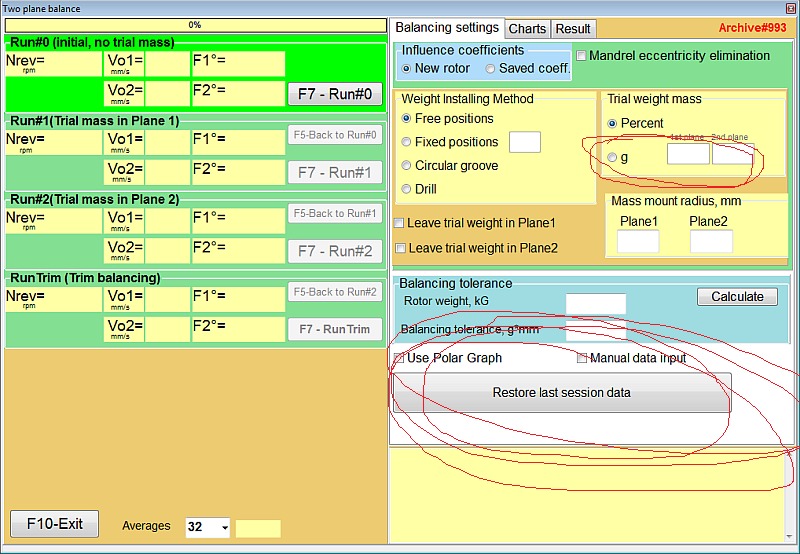
Greška COM/USB porta starih verzija. Pojavila se masovno nakon sigurnosnih ažuriranja Windows 11 (promijenjeno rukovanje USB portom). Ispravljeno u trenutnim verzijama (2.2.30+ / firmware 5.5) — jezgra komunikacije s uređajem je prepisana. Do ažuriranja može pomoći ponovno pokretanje i ponovno priključivanje USB-a. Ako se pojavi usred balansiranja, Obnovi sesiju podataka gumb oporavlja niz mjerenja — nema potrebe počinjati iznova.
„Cannot open file …\Report\Tpl\ES\protocol.htm“ / program ne prelazi na RUN 1
Greška starog instalera — datoteke jezičnog paketa i predlošci izvještaja nisu se instalirali. Ispravljeno u trenutnom instaleru. Predlošci izvještaja nalaze se u reporttpl mapi (format .htm) — možete ih prilagoditi svom memorandumu.
Pogreška pri unosu broja s zarezom/točkom
Stara greška decimalnog separatora (ovisila je o regionalnim postavkama Windowsa). Ispravljeno od verzije 1.71 — trenutne verzije je nemaju.
Spremljeni rotori/arhiva nestali su nakon ažuriranja
Greška stare verzije (podaci su bili u mapi programa i brisali su se pri reinstalaciji). U novim verzijama arhive su premještene u korisničku mapu i preživljavaju ažuriranja.
Pogreške zbog nepažnje korisnika — to nisu greške u softveru
Ovdje program radi ispravno — postavke su jednostavno pogrešne. Ove dvije stavke redovito korisnicima koštaju dane rada; provjerite ih prve.
Vrijednosti mase u postocima umjesto u gramima
Uzrok: polje radijusa montiranja utega je prazno i/ili masa probnog utega nije unesena — program prelazi na postotak probne mase. Rješenje: na prvoj kartici Postavki balansiranja unesite radijus i masu probnog utega i provjerite g / % preklopnik (“grami”).
Stvarni primjer: uređaj je prikazivao „322“ i „177“, a korisnik je pretpostavio da su to grami. To su bili postoci mase probnog utega.
Potvrdni okvir „remove mass“ / „add mass“
Postavke određuju metodu korekcije: dodavanje utega (zavarivanje) ili uklanjanje materijala (bušenje). Ako je označeno “ukloni” dok vi zavarujete utege — predznak je obrnut i vibracija raste. Stvarni slučaj: malčer Seppi nije se mogao balansirati dok ta kvačica nije uočena.
Postavke i ostale napomene
Program je na engleskom iako je odabran drugi jezik
Odaberite jezik u postavkama i ponovno pokrenite program — jezik se primjenjuje nakon ponovnog pokretanja. Ako to ne pomogne, jezični paket se nije učitao (stara verzija, OneDrive instalacija, nepotpuni instalacijski program): ažurirajte na noviju verziju; verzije 2.2.x i novije sadrže 20+ jezika. Svi jezici rade i na Windows 7.
“Pogreška tijekom rada — pokrenite kao administrator”
Ako program ne može spremiti datoteku/izvještaj, pokrenite ga kao administrator (desni klik → Run as administrator).
Izvještaji
Izvještaj se generira iz predloška (RTF/HTM); zatim ga možete spremiti/ispisati u PDF pomoću Windows alata. Tipičan izvještaj za kupca — “Izvještaj o balansiranju” s početnom/konačnom vibracijom, masama i kutovima.
Ako ništa ne pomaže
- Snimite zaslon pogreške i zabilježite na kojem se koraku pojavljuje.
- Novije verzije imaju ugrađeno prijavljivanje pogrešaka — koristite ga.
- Besplatna podrška — e-pošta ([email protected]) i forum vibromera.eu/community; prioritetna WhatsApp podrška je na pretplatu.
- Rezervno rješenje kada posao treba završiti odmah: drugo prijenosno računalo (bilo je slučajeva u kojima je sve radilo na Windowsu 10, ali ne i na određenom prijenosniku s Windowsom 11).